

Nobody sets out to send a bad email. You’re moving fast, nine tabs deep, and you hit send on something that felt fine at the time. Then you reread it an hour later and wince.
This list is ordered by how the damage happens. It starts with the mistakes that make people misunderstand you, moves into the ones that make you look careless, and ends with the ones that create real work for other people. Some of these have hard data behind them. Others are rules the professional world quietly agreed on, and nobody hands you a waiver for those. Each item ends with a line labeled
The fix:, so if you already know you’re guilty and just want the correction, skim for the bold.
One number to set the stage: a Grammarly and Harris Poll survey of 1,252 US professionals estimated that teams lose nearly a full workday every week to poor communication, around $12,506 per employee per year. Grammarly sells a writing tool, so treat that dollar figure as their own estimate rather than gospel. Still, if you’ve ever burned twenty minutes decoding a three-line email from a coworker, the direction feels right.
1. Sarcasm that arrives without the smile
You meant it as a joke. “Wow, thanks for the heads-up.” Three words, a little dry, obviously kidding. Except in an email there is no obvious. The reader hears flatness, or worse, resentment.
Psychologists Justin Kruger and Nicholas Epley and their colleagues ran five experiments on exactly this, published in the Journal of Personality and Social Psychology. Senders consistently believed they could convey tone over email better than they actually could, and sarcasm was where the gap showed up hardest. The senders heard the joke in their heads while typing. The readers never did.
Sent: “Wow, thanks for the heads-up. Really appreciate it.”
Better: “Thanks for letting me know the review moved to Thursday. Next time a warning before you rebook would save me the prep. See you then.”
The fix: Cut the irony from anything with stakes. If a message genuinely needs to be light, add the cue your voice would have carried, because “Hope that made sense” beats a wink emoji every time. Then reread the draft in the flattest voice you can manage. If it sounds passive-aggressive read flat, that’s how it will land.
WriteMail.ai does a tone pass on your draft before it goes out, which helps precisely because you are the least reliable judge of your own sarcasm.
2. The subject line in ALL CAPS
“URGENT: PLEASE READ.” You’ve sent one. Everyone has.
Here’s what it actually costs. The email app Boomerang analyzed more than 300,000 email threads from public archives and found that all-uppercase subject lines got a reply 30% less often than everything else, a 34.6% response rate against 50%. Their own author cautioned that the all-caps sample was small, roughly 1,700 emails, so don’t build a thesis on it. The pattern still holds, and for a second reason: all-caps subjects are a known spam signal, so some filters flag them before a human ever sees the message. Your urgency can literally reduce the odds the email arrives.
Caps aren’t emphasis in email. They’re volume. A message that shouts reads like panic, and panic makes people trust the message less.
Sent: Subject: URGENT: PLEASE READ
Better: Subject: Need approval on the Herrera contract by 3pm today
The fix: If something genuinely is urgent, say so in specific words instead of volume. “Need approval by 3pm today.” Specific beats loud.
3. No subject line, or one that says nothing
Only 14% of emails sent with no subject line at all received a response in Boomerang’s analysis of over 40 million emails. Fourteen percent. You’re handing the reader a decision they never asked for: open an unknown message from a semi-known address, or let it sit in the pile.
The lazy versions are almost as bad. “Hi.” “Quick question.” “Following up.” None of them tell the reader what’s waiting inside or why it matters today. The same dataset found that subject lines of three or four words got the most replies of any length. Not ten words of context. Not a novel.
Sent: Subject: (blank)
Better: Subject: Q3 budget approval
The fix: Name the thing in three or four words. “Q3 budget approval.” “Interview time Tuesday?” Do that and you’ve done most of the work a subject line exists to do.

4. The wall of text
You know the shape. One paragraph, no breaks, forty lines long, drifting from the meeting recap into a client complaint and back around to a question that might have been the point. The reader’s eyes glaze somewhere around line three, the message gets skimmed, and then it gets parked for later. Later usually means never.
The same 40-million-email dataset put numbers on this. Emails between 50 and 125 words got the highest response rates, above 50%. From 125 words out to about 500, response rates slid to around 44% and then stayed roughly flat all the way to 2,000 words. Past 2,500 words, they dropped below 35%.
Notice what that shape means. The penalty isn’t a gentle slope, it’s a cliff you walk off once the email stops being scannable. Length isn’t the crime. Density is.
Sent: “So we had the kickoff and then Marcus raised the timeline and the client pushed back on the invoice, which ties into what Dana flagged last week, and I said we’d look into it, but anyway can we move the launch to the 14th? Also the deck needs updating and someone should tell marketing.”
Better: “Need a yes or no by Wednesday: do we move the launch to the 14th? Background from the client call is below.”
The fix: Break the email into short paragraphs, one idea each, and put the ask near the top where the skimmers live.
Purdue University’s Online Writing Lab says the same thing without the data: write clear, short paragraphs, be direct, and don’t write unnecessarily long emails that waste the recipient’s time.
5. Making them guess what you want
The email that says “let me know your thoughts” and then stacks four open threads with no actual question anywhere. What are they supposed to reply to? When the ask is fuzzy, most people answer nothing at all, because picking one thread risks guessing wrong and guessing wrong has a social price.
Boomerang found that emails asking one to three questions were 50% more likely to get a reply than emails that asked none. The likely reason is that questions give the reader a concrete, finishable action. Three is the ceiling, by the way. Past that you’re assigning homework, and homework gets deferred.
Sent: “Let me know your thoughts on the vendor situation. Also the timeline, and whatever you think on pricing.”
Better: “Should we sign the Acme contract? Need your yes or no by Friday.”
The fix: State the ask in one sentence near the top, then the background if background is needed. “Let me know your thoughts on the vendor situation” becomes “Should we sign the Acme contract? Need your yes or no by Friday.”
6. Typos
You can call typos minor. Your reader doesn’t experience them that way. A misspelled word reads as not caring about this email, and by extension about the person reading it.
Researchers ran a randomized experiment with 301 UK participants rating short texts, and the penalty for carelessness was measurable. Texts containing five misspellings were rated 8.86 points less trustworthy on a 100-point scale. Texts with five instances of needless capitals lost 6.41 points. Text carrying both lost 14.33 points. Worth being precise about what they tested: the excerpts were online forum posts about health topics, not workplace email. But the mechanism travels. Readers treated the errors as a form of incivility, the assumption that the writer couldn’t be bothered.
Sent: “Please fined the attached invoice for Septemer. Let me know if you have and questons.”
Better: “The September retainer invoice is attached. Flag anything that looks off and I’ll correct it before it goes to the client.”
The fix: One careful reread, not the same-second skim you do while typing. A real read, out loud if the email matters, before it goes.
WriteMail.ai catches typos and tone problems in the same pass, which matters because the worst errors are the ones your brain autocorrects every single time you reread your own words.
7. No greeting, no sign-off
An email that opens with the request and closes with the request reads like a note slid under a door. Some readers won’t consciously register the missing “Hi Sam,” and some will quietly file you under abrupt. You have no way of knowing which reader you’re dealing with, which is exactly why the four seconds of insurance is worth buying.
Purdue’s Online Writing Lab treats both as standard, not optional.
Sent: “Need the page designs by Friday.”
Better: “Hi Priya, could you send the page designs by Friday? If Thursday is easier, that works too. Thanks, Dan”
The fix: Open with a greeting and close with a sign-off phrase and your name. “Hi Priya,” at the top. “Thanks, Dan,” at the bottom. Done.
One exception people get wrong. If a thread has gone back and forth six times in an hour, “Hi Priya” on message seven starts to read like a formality loop. Match the register of the conversation. The rule is to start warm and close clean, not to perform it every single time.
8. Text-speak and slang in formal email
“Can u review this asap? thx!!” might get a pass in Slack. In an email to a client, a professor, or anyone senior to you, it reads as though you don’t know which context you’re in.
Purdue’s guidance on this is direct:
Sent: “Can u review this asap? thx!!”
Better: “Can you review the Alvarez SOW by Thursday? I can’t send it to the client until you sign off.”
The fix: Use standard spelling, punctuation, and capitalization, and skip text abbreviations entirely. No “u” for “you.” No “pls.”
The line isn’t about formality for its own sake. It’s about signaling that you know the register of the room. Email sits closer to a letter than to a chat window, and the shorthand that feels efficient to you can read as sloppy to someone working through 80 messages a day. Save “u” for the tools built around it.
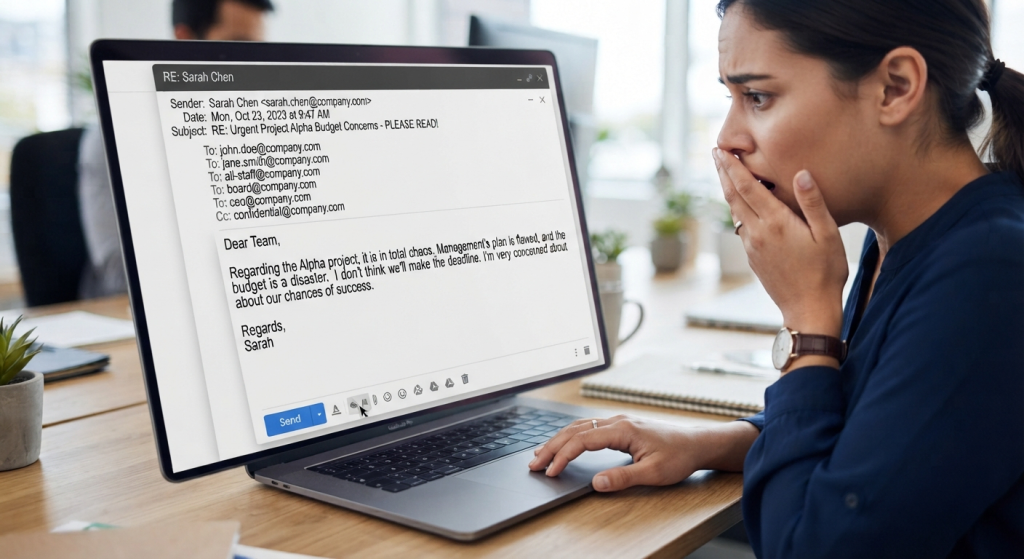
9. Reply-all and the wrong recipient
This is the only mistake on the list with a public embarrassment factor. You meant to reply to one person, and instead the whole department learns what you think of the new org chart.
Purdue’s phrasing is almost funny in how resigned it is: “Too many people have intended to reply to the original sender alone, when in fact, their reply went to the entire list, much to their embarrassment.”
Reply-all has a second cost that gets less attention. Every needless reply-all multiplies the message for everyone on the thread. A 20-person thread where three people hit reply-all produces sixty notifications, none of which contained new information.
Sent: To: the 11-person launch thread, sent via Reply All: “Will do, thanks.”
Better: To: Dana, the one person who asked: “Will do, the updated timeline is with you by noon.”
The fix: Two habits cover most of it. Check the To: field before you send, every time, because the moment before send is the only one where the mistake is free to fix. And before you add people to a thread, ask whether they need to be there or merely might someday want to know.
10. The reply that takes a week
Silence for five days, then “Sorry for the delay, anyway yes that works.” The answer is fine. The week of silence is what the other person remembers, because for a week they were left doing the unpaid work of deciding whether to follow up, wait, or route around you.
Purdue’s guidance on timing is deliberately soft: respond within a reasonable time frame. What counts as reasonable depends on the ask.
Sent: (day five) “Sorry for the delay, anyway yes that works.”
Better: (same afternoon) “Got this, need to check with finance, back to you by Thursday.”
The fix: If you can’t give a real answer within two business days, send a holding note instead. “Got this, need to check with finance, back to you by Thursday.” Ten words. It costs nothing and it turns a silence into a commitment.
Final thoughts: thirty seconds before you send
Almost none of these mistakes come from not knowing the rules. You knew all ten before you started reading, and nothing in the fix lines above told you anything new. They come from writing fast, at the exact moment when rereading feels like a waste of time and a misread email feels free.
That’s why the ten fixes above are one fix applied ten ways: thirty seconds between the finished draft and the send button. Knowing the rules wasn’t the problem, so knowing more of them won’t help. The pause is what’s missing. Thirty seconds against a habit that quietly shapes how competent people decide you are.